
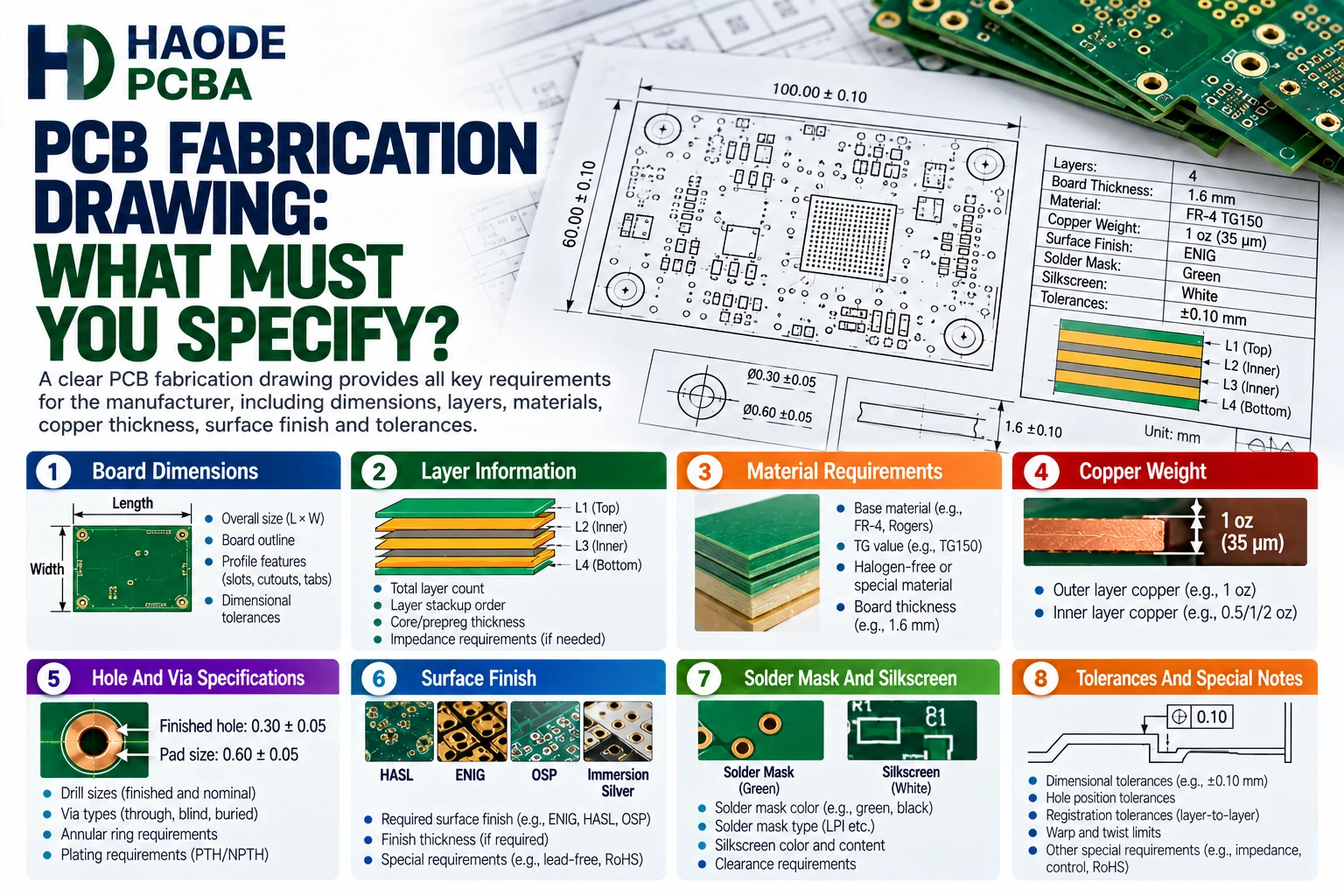
A PCB fabrication drawing defines the physical, material, dimensional, performance, and inspection requirements for an unpopulated printed circuit board. It tells the fabricator what the finished PCB must be—not merely what copper shapes appear in the design files.
Gerber, ODB++, IPC-2581, NC drill, netlist, and stackup files all carry important manufacturing data. However, none of them automatically communicates every purchasing, tolerance, testing, workmanship, and acceptance requirement. Therefore, buyers need a controlled fabrication drawing that connects those files into one unambiguous production specification.
At minimum, the drawing should define:
- Part Number And Revision
- Finished Board Dimensions
- Finished Board Thickness
- Material Requirements
- Layer Count And Stackup
- Copper Weight By Layer
- Finished Hole Sizes
- Via Structures
- Surface Finish
- Controlled-Impedance Requirements
- Solder Mask And Legend Requirements
- Gold-Finger Requirements
- Dimensional Tolerances
- Bow And Twist Limits
- Electrical Test Requirements
- Applicable IPC Standards And Revisions
- Inspection And Documentation Requirements
- File-Conflict Resolution Rules
A strong drawing reduces engineering questions, quotation assumptions, unauthorized substitutions, dimensional disputes, and production delays. More importantly, it gives the manufacturer measurable requirements that can support final acceptance.
What Is A PCB Fabrication Drawing?
A PCB fabrication drawing is a controlled engineering document that describes how the finished bare circuit board must be constructed and inspected.
It may include:
- Dimensioned board views
- Mechanical details
- Hole tables
- Layer-stack information
- Material notes
- Surface-finish requirements
- Tolerance tables
- Impedance tables
- Special-process notes
- Inspection requirements
- Applicable standards
- Revision history
The drawing does not need to repeat every trace, pad, plane, or copper feature contained in the electronic design data. Instead, it should add the requirements that manufacturing data alone cannot define clearly.
For example, a Gerber file can show the position of a plated hole. However, the PCB fabrication drawing should clarify its finished diameter, tolerance, plating requirement, positional tolerance, and functional classification.
Similarly, the copper data may show a card-edge pattern. Nevertheless, the drawing must state the required gold type, plating thickness, bevel, finished thickness, and inspection criteria.
PCB Fabrication Drawing Versus Gerber And ODB++ Files
A PCB fabrication drawing and the electronic manufacturing files perform different jobs.
| File Or Document | Primary Purpose | Typical Missing Information |
|---|---|---|
| Gerber Files | Describe Individual Image Layers | Material, Performance Class, File Priority, Detailed Acceptance Requirements |
| NC Drill File | Defines Hole Locations And Tool Sizes | Finished Hole Size, Plating Status, Tolerance, Special Via Requirements |
| ODB++ | Combines PCB Geometry And Manufacturing Data | Customer-Specific Purchasing And Acceptance Notes |
| IPC-2581 | Transfers Intelligent PCB And Assembly Data | Project-Specific Contractual Requirements |
| Netlist | Supports Electrical Connectivity Verification | Mechanical And Material Requirements |
| Stackup Table | Defines Layer Construction | Complete Board Dimensions And Inspection Rules |
| PCB Fabrication Drawing | Controls Finished-Board Requirements | Detailed Copper Geometry Already Contained In Design Data |
Intelligent data formats can reduce manual interpretation. Even so, they do not eliminate the need for controlled product requirements.
For instance, an ODB++ package may identify a surface-finish region. However, the buyer may still need to specify ENIG thickness, selective hard gold, tape-test expectations, or prohibited substitutions.
A complete PCB assembly file package should keep fabrication data, assembly data, drawings, BOM revisions, and approved changes synchronized.
Why The PCB Fabrication Drawing Matters
The PCB fabrication drawing acts as a communication and acceptance document between the designer, purchasing organization, PCB fabricator, assembly supplier, and quality team.
Without it, different parties may make different assumptions about:
- Whether dimensions apply before or after plating
- Whether drill sizes represent tool sizes or finished holes
- Whether total thickness includes solder mask
- Whether copper weights represent starting or finished copper
- Whether a via may contain solder mask
- Whether material substitutions require approval
- Whether impedance values apply to coupons or production traces
- Whether a general tolerance overrides a local tolerance
- Whether a visual requirement applies to IPC Class 2 or Class 3
- Which file takes priority when released files conflict
Consequently, a technically complete drawing can prevent failures before production begins.
However, the drawing should specify results instead of unnecessarily controlling the supplier’s internal process. For example, the buyer normally needs to define the finished hole size and plating requirement. The fabricator should then select a suitable drill diameter and plating allowance.
What Should The Title Block Include?
The title block identifies the controlled product and its release status.
Include:
- Customer Name
- PCB Part Number
- Drawing Number
- Drawing Title
- Revision
- Release Date
- Units
- Drawing Scale
- Sheet Number
- Designer Or Approver
- Applicable Product Class
- Confidentiality Or Proprietary Notice, If Required
The part number and revision must match the released Gerber, ODB++, IPC-2581, drill, netlist, stackup, and purchase-order package.
Otherwise, the supplier may combine files from different releases. This creates a particularly serious risk when the outline remains unchanged but the drill pattern, copper design, or stackup has changed.
Therefore, every released file should use a consistent revision-control method.
Define Units, Datums, And The Coordinate System
The PCB fabrication drawing should clearly identify whether dimensions use millimeters or inches. Do not rely only on the CAD system’s export settings.
The drawing should also define:
- Primary Datum
- Secondary Datum
- Tertiary Datum, If Needed
- Board-Origin Location
- Coordinate Direction
- Dimensioning Method
- Decimal Precision
- General Tolerance By Decimal Place
Datums become especially important when the PCB must align with:
- Enclosure Openings
- Press-Fit Connectors
- Backplanes
- Card Guides
- Heat Sinks
- Optical Sensors
- Mechanical Keying Features
- Test Fixtures
- Panel-Mounted Connectors
For example, dimensions chained from several intermediate features can accumulate tolerance. Instead, dimension critical connector locations from a shared functional datum.
Also, avoid using the drawing border or an undefined corner of a routed panel as the only reference point.
Define The Board Outline And Mechanical Features
The drawing should show the finished board outline and every mechanically significant feature.
These may include:
- Routed Edges
- Internal Cutouts
- Slots
- Notches
- Chamfers
- Bevels
- Counterbores
- Countersinks
- Edge Castellations
- Mounting Holes
- Tooling Holes
- Fiducials
- Connector Keying
- Controlled Edge Radii
- Breakaway Tabs
- V-Score Locations
Clearly distinguish between:
- Plated And Non-Plated Holes
- Routed And Drilled Slots
- Finished And Fabrication-Panel Dimensions
- Component Clearance Holes And Mounting Holes
- Functional Cutouts And Panel Tooling Features
A mechanical outline should form a closed, continuous profile. In addition, remove duplicate lines, zero-length segments, and overlapping arcs before release.
If the enclosure fit depends on a specific feature, give that feature its own tolerance. Do not assume the general outline tolerance will protect every interface.
Specify Finished PCB Thickness
The drawing should define the nominal finished thickness and its allowed tolerance.
For example:
Finished Board Thickness: 1.60 mm ±0.16 mm
However, that note may still be incomplete for a board with a card-edge connector, press-fit connector, controlled impedance, or tight enclosure fit.
Clarify:
- Whether Thickness Includes Solder Mask
- Measurement Location
- Connector-Area Thickness
- Local Thickness Requirements
- Permitted Copper Or Plating Buildup
- Applicable Measurement Method
- Whether Multiple Locations Require Measurement
A card-edge connector may require tighter control than the rest of the PCB. Therefore, the drawing should identify the actual mating region and its local thickness requirement.
Our guide to PCB thickness explains how thickness affects connectors, stackups, via aspect ratio, SMT handling, and enclosure fit.
Specify PCB Materials Precisely
A material note such as “FR-4” does not define one unique material.
FR-4 includes many laminate families with different:
- Glass-Transition Temperatures
- Decomposition Temperatures
- Z-Axis Expansion
- Dielectric Constants
- Dissipation Factors
- Moisture Absorption
- Thermal Conductivity
- CAF Resistance
- Flammability Ratings
- Lead-Free Process Compatibility
Therefore, the PCB fabrication drawing should specify the properties that matter to the product.
Possible requirements include:
- Approved Laminate Manufacturer And Family
- Minimum Tg
- Minimum Td
- Maximum Z-Axis CTE
- Dk And Df Test Conditions
- CTI Requirement
- CAF Requirement
- Thermal Conductivity
- UL Flammability Rating
- Halogen-Free Requirement
- RoHS Or REACH Requirements
- Maximum Number Of Lead-Free Thermal Cycles
- Prohibited Material Substitutions
If exact brand control is unnecessary, define performance limits and an approved-equivalent process. Conversely, if testing and qualification depend on one laminate family, prohibit substitutions without written authorization.
Include An Approved Layer Stackup
The stackup controls total thickness, impedance, copper balance, dielectric spacing, drilling capability, and thermal behavior.
Include:
- Layer Number
- Layer Function
- Copper Weight
- Core Thickness
- Prepreg Construction
- Finished Dielectric Thickness
- Material Family
- Total Finished Thickness
- Controlled-Impedance Layers
- Special Foil Requirements
- Sequential-Lamination Structure
- Blind Or Buried Via Connections
For controlled-impedance designs, the production stackup should not remain an informal quotation assumption. Instead, the designer and fabricator should approve it before production.
The drawing should also state whether the supplier may adjust dielectric thickness or trace geometry to meet impedance. If adjustments are allowed, define the approval and reporting process.
A symmetrical stackup generally supports better mechanical stability. However, electrical layer symmetry alone does not guarantee mechanical balance. Copper weight, resin content, glass style, and local copper distribution also matter.
Define Copper Weight By Layer
The PCB fabrication drawing should identify copper requirements for every conductive layer.
Do not write only:
Copper: 1 oz
That note leaves several questions unanswered:
- Does it apply to outer layers only?
- Does it describe starting foil or finished copper?
- Does it include electroplated copper?
- Do internal planes use the same weight?
- Does the requirement apply to local heavy-copper areas?
- What tolerance applies?
A better table may look like this:
| Layer | Function | Copper Requirement |
|---|---|---|
| L1 | Top Signal | 35 µm Finished Minimum |
| L2 | Ground Plane | 35 µm Nominal |
| L3 | Power Plane | 70 µm Nominal |
| L4 | Bottom Signal | 35 µm Finished Minimum |
However, the correct wording depends on the purchasing requirement and applicable standard.
Thicker outer copper can improve current capacity. Nevertheless, it also changes etching capability, trace geometry, annular-ring margin, solder mask coverage, and total thickness. Review these effects before increasing copper weight.
Our PCB copper weight guide explains the difference between copper-ounce terminology, physical thickness, finished copper, and current-carrying design.
Create A Complete Drill Table
A drill table should identify the finished condition of each hole type.
Include:
- Hole Identifier
- Quantity
- Finished Diameter
- Diameter Tolerance
- Plated Or Non-Plated Status
- Slot Width And Length
- Via Classification
- Special Filling Or Capping
- Controlled-Depth Requirement
- Press-Fit Classification
- Positional Tolerance, If Critical
The most common ambiguity involves drill diameter versus finished hole size.
The CNC drill tool must normally create a larger opening than the specified finished plated-hole diameter because copper plating reduces the opening. Therefore, the designer should specify the functional finished hole size and allow the fabricator to calculate the production drill.
For example:
Finished Plated Hole: 0.30 mm ±0.05 mm
This wording provides a measurable result. By contrast, “Use 0.30 mm drill” may produce a smaller finished opening after plating.
Our article on PCB drill size versus finished hole size explains plating allowance, drill tolerance, press-fit holes, slots, and aspect-ratio constraints.
Control Annular Ring And Registration
Annular ring depends on pad size, finished hole size, drilling accuracy, artwork registration, plating, and the applicable acceptance class.
The drawing may need to define:
- Minimum External Annular Ring
- Minimum Internal Annular Ring
- Allowed Breakout
- Tangency Restrictions
- Teardrop Requirements
- Pad Removal Rules
- Via-Pad Exceptions
- Class-Specific Acceptance
However, do not add a generic annular-ring value without checking the design data. A requirement that exceeds the available pad geometry cannot become manufacturable simply because it appears in a note.
Instead, compare the finished hole, pad diameter, layer registration capability, and required performance class.
Our PCB annular ring guide covers calculation, breakout, tangency, via reliability, and DFM review.
Identify Every Special Via Structure
The drawing should identify all nonstandard via constructions.
Examples include:
- Blind Vias
- Buried Vias
- Microvias
- Stacked Microvias
- Staggered Microvias
- Via-In-Pad
- Filled Vias
- Capped Vias
- Tented Vias
- Plugged Vias
- Resin-Filled Through Vias
- Back-Drilled Vias
- Controlled-Depth Drilling
For each relevant via type, define:
- Connected Layers
- Finished Diameter
- Target Pad Size
- Dielectric Depth
- Filling Material
- Copper-Cap Requirement
- Planarity Requirement
- Surface-Finish Requirement
- Sequential-Lamination Cycle
- Back-Drill Stub Limit
- Inspection Or Coupon Requirement
Do not treat “filled,” “plugged,” “tented,” and “capped” as interchangeable terms. They produce different finished structures.
Moreover, stacked microvias require special reliability review. Therefore, specify the approved structure instead of allowing an undocumented change between staggered and stacked designs.
Our PCB microvia reliability guide discusses microvia aspect ratio, stacked structures, thermal cycling, copper interfaces, and qualification.
Add Controlled-Impedance Requirements
Controlled impedance requires more than a note that says “50 ohms.”
The drawing or accompanying impedance table should identify:
- Trace Type
- Target Impedance
- Tolerance
- Signal Layer
- Reference Layer Or Layers
- Single-Ended Or Differential Structure
- Coupon Requirement
- Test Method
- Test Frequency, If Relevant
- Reporting Requirement
- Permitted Geometry Adjustment
- Approval Requirements
For example:
| Structure | Signal Layer | Reference | Target |
|---|---|---|---|
| Single-Ended Microstrip | L1 | L2 | 50 Ω ±10% |
| Differential Stripline | L3 | L2/L4 | 100 Ω ±10% |
The designer should also identify critical nets in the design data. Otherwise, the fabricator may know the target structure but not which traces require control.
If the supplier may modify trace width, spacing, or dielectric thickness, define the allowed range. In addition, require approval when an adjustment affects routing clearance, current capacity, or mechanical thickness.
Specify The Surface Finish
The surface-finish note should identify the required finish and any critical thickness or regional requirements.
Common finishes include:
- HASL
- Lead-Free HASL
- ENIG
- ENEPIG
- Immersion Silver
- Immersion Tin
- OSP
- Electrolytic Hard Gold
- Selective Gold Plating
- Bare Copper With Preservative
A vague note such as “gold finish” is not sufficient. It does not distinguish immersion gold from electrolytic hard gold, nor does it define the underlying nickel structure.
The correct finish depends on:
- Component Pitch
- BGA Or LGA Assembly
- Wire Bonding
- Card-Edge Wear
- Shelf Life
- Multiple Reflow Cycles
- Contact Resistance
- Coplanarity
- Corrosion Risk
- Regulatory Requirements
If a board uses more than one finish, mark each region clearly. Also define masking boundaries and overlap rules.
Our PCB surface finish comparison explains the assembly, shelf-life, flatness, corrosion, and contact-wear differences among common options.
Define Solder Mask And Legend Requirements
The PCB fabrication drawing should identify:
- Solder Mask Type
- Mask Color
- Matte Or Gloss Finish
- Mask On One Or Both Sides
- Solder Mask Defined Pads, If Used
- Via Tenting Requirements
- Mask Clearance Rules
- Exposed Copper Restrictions
- Legend Color
- Legend Side
- Reference-Designator Requirements
- Date Code Or Lot Marking
- UL Marking, If Required
- Customer Logo Requirements
Avoid a universal note that says “tent all vias” when the design includes:
- Test Vias
- Thermal Vias
- Via-In-Pad Structures
- Connector Vias
- Filled And Capped Vias
- Grounding Features
- Probe Targets
Instead, identify the relevant via classes through a table, net attribute, or controlled data layer.
Also, clarify whether the supplier may clip legend markings that overlap pads or openings. Automatic clipping may prevent contamination, but it can also remove important polarity or identification marks.
Define Gold-Finger Requirements
Card-edge contacts require more information than a general surface-finish note.
Specify:
- Contact Area
- Hard-Gold Requirement
- Nickel Thickness
- Gold Thickness
- Bevel Angle
- Bevel Depth
- Distance From Contact Area
- Finished Edge Thickness
- Key Notches
- Chamfers
- Mask Keep-Out
- Plating-Bar Removal
- Acceptance Criteria
In addition, identify whether the card-edge thickness requires a tighter local tolerance than the rest of the board.
The mating connector’s specification should control the contact geometry and allowable thickness. Therefore, include the connector part number when possible.
Add Functional Dimensional Tolerances
A general tolerance block can control noncritical features. However, it should not replace specific tolerances for functional interfaces.
Potentially critical dimensions include:
- Finished Board Length And Width
- Mounting-Hole Position
- Connector-To-Edge Distance
- Slot Width
- Press-Fit Hole Diameter
- Card-Edge Thickness
- Bevel Geometry
- Heat-Sink Mounting Location
- Sensor Alignment
- Enclosure Interface
- Castellation Position
- Controlled-Depth Feature
Avoid applying extremely tight tolerances to every feature. This increases cost and may not improve product performance.
Instead, identify the mechanical function and assign realistic limits to the features that control it.
For example, a ±0.05 mm tolerance may be justified for a precision connector position. The same tolerance may add unnecessary cost when applied to the full routed outline of a large commercial PCB.
Include Bow And Twist Requirements
The drawing should define the maximum permitted bow and twist when flatness affects assembly or installation.
A common starting point for rigid PCBs with SMT components is 0.75%. However, that number does not guarantee successful assembly for every design.
Large, thin, fine-pitch, BGA, LGA, press-fit, or tightly mounted boards may need a tighter requirement.
Therefore, specify:
- Maximum Bow
- Maximum Twist
- Applicable Test Method
- Panel Or Individual-Board Condition
- Measurement Temperature
- Preconditioning Requirements
- Measurement Before Or After Thermal Exposure
- Local Flatness Requirements, If Any
Room-temperature bare-board flatness does not necessarily predict dynamic deformation during reflow. Consequently, high-risk BGA designs may also require thermal warpage evaluation.
Control PCB Panelization
If the PCB supplier delivers boards in panels, the drawing or a separate panel drawing should define the delivery format.
Include:
- Panel Length And Width
- Number Of Boards
- Board Orientation
- Rail Width
- Tooling Holes
- Global Fiducials
- Local Fiducials
- V-Score Locations
- Routed Slots
- Breakaway Tabs
- Mouse-Bite Hole Pattern
- Copper Keep-Out
- Component Overhang
- Panel Marking
- Panel Flatness
- Depanelization Method
The fabricator may propose a production panel that differs from the assembly panel. Therefore, clearly identify which panel the PCBA factory must receive.
Panel design affects paste printing, component placement, reflow support, selective soldering, testing, and depanelization. Review our PCB panelization guidelines before approving rails and breakaway features.
Specify Electrical Testing
A note such as “100% E-test” may still leave important questions unanswered.
The fabrication package should define:
- 100% Or Sample Testing
- Netlist Source
- Bare-Board Test Method
- Flying-Probe Or Fixture Testing
- Isolation Threshold
- Continuity Threshold
- High-Voltage Test, If Required
- Test Certificate Requirement
- Repair Restrictions
- Retest Requirements
- Data-Retention Period
The fabricator should compare the finished PCB against a known-good netlist. This step can detect opens and shorts that visual inspection cannot find.
However, a netlist test does not confirm impedance, material identity, hole size, plating thickness, surface finish, or dimensional compliance. Therefore, electrical testing must form one part of a broader inspection plan.
Define Inspection And Reporting Requirements
The drawing should identify any inspection records that the buyer expects with the shipment.
Possible deliverables include:
- Certificate Of Conformance
- Electrical-Test Certificate
- Microsection Report
- Impedance Report
- Final Inspection Report
- First Article Report
- Dimensional Report
- Material Certificate
- Surface-Finish Thickness Report
- Copper-Plating Thickness Report
- Ionic-Contamination Report
- Solderability Report
- X-Ray Report
- Cross-Section Images
- Lot-Traceability Records
Do not request every report by default. Instead, connect each report to a design risk, customer requirement, qualification plan, or regulatory obligation.
For example, microsection data may add real value for a high-aspect-ratio multilayer PCB. Conversely, it may provide little benefit for a simple two-layer prototype with large plated holes.
State The IPC Standard And Revision
Avoid a note that says only:
Build To IPC Standards
IPC publishes many standards, and each one addresses a different subject. In addition, requirements can change between revisions.
The drawing may reference documents such as:
- IPC-2221 For Generic Printed-Board Design
- IPC-6012 For Rigid Printed-Board Qualification And Performance
- IPC-A-600 For Printed-Board Acceptability
- IPC-4101 For Base Materials
- IPC-4552 For ENIG
- IPC-2614 For Printed-Board Fabrication Documentation
- IPC-TM-650 For Applicable Test Methods
IPC identifies IPC-2614 as a sectional standard for printed-board fabrication documentation.
Meanwhile, IPC-2221C provides generic printed-board design requirements.
IPC also released IPC-6012F for rigid printed-board qualification and performance requirements.
However, citing a standard does not replace project-specific requirements. The drawing must still identify thickness, material, stackup, hole sizes, finish, impedance, tolerances, and reporting expectations.
Also, state the exact revision. Do not assume every supplier, customer, and contract uses the same edition.
Define Which File Takes Priority
Released PCB packages sometimes contain conflicting information.
For example:
- The Drawing Says 1.6 mm, But The Stackup Says 1.2 mm.
- The Drill Table Says 0.30 mm Finished, But The Drill File Labels It 0.30 mm Tool Size.
- The Gerber Shows Exposed Copper, But The Mask Note Says All Vias Must Be Tented.
- The Purchase Order Requests ENIG, But The Drawing Still Says Lead-Free HASL.
- The ODB++ Package Contains A New Revision, But The PDF Drawing Has An Older Revision.
The supplier should not guess which requirement is correct.
Instead, the drawing should define a conflict-resolution rule. For example:
In The Event Of A Conflict Between Released Files, The Fabricator Shall Stop Work And Obtain Written Customer Clarification. No Assumption Or Unapproved Data Modification Is Permitted.
A company may also establish a documented order of precedence. For example:
- Approved Engineering Change Or Written Deviation
- Purchase Order And Customer-Specific Requirements
- Released PCB Fabrication Drawing
- Approved Stackup And Impedance Table
- Intelligent Manufacturing Data
- Gerber And NC Drill Data
- Readme Or Informational Files
This hierarchy is only an example. No universal order works for every company or contract. Therefore, the buyer must define and approve the hierarchy used for the project.
This conflict matrix provides more value than adding another generic fabrication note because it tells the supplier exactly what to do when two apparently valid files disagree.
Replace Ambiguous Fabrication Notes
The following table shows how vague notes can create manufacturing uncertainty.
| Ambiguous Note | Why It Fails | Better Requirement |
|---|---|---|
| Use Standard FR-4 | Does Not Define Thermal Or Electrical Properties | Specify Approved Material Or Required Tg, Td, CTE, Dk, Df, And UL Rating |
| Board Thickness 1.6 mm | Omits Tolerance And Measurement Condition | Finished Thickness 1.60 mm ±0.16 mm, Measured At Defined Locations |
| Copper 1 oz | Does Not Identify Layers Or Finished Condition | Provide Copper Requirement For Every Layer |
| Gold Finish | Does Not Distinguish ENIG From Hard Gold | Specify Finish Type, Region, And Thickness |
| Drill 0.30 mm | May Mean Tool Size Or Finished Hole | Specify 0.30 mm Finished Plated Hole And Tolerance |
| Tent All Vias | May Conflict With Test Or Via-In-Pad Requirements | Identify Via Classes And Required Mask Condition |
| Impedance 50 Ohms | Omits Layers, References, And Tolerance | Provide A Controlled-Impedance Table |
| Build To IPC | Does Not Identify Document Or Revision | List Applicable Standards, Revisions, And Product Class |
| Board Must Be Flat | Provides No Measurable Limit | Specify Maximum Bow And Twist And Test Method |
| No Defects Allowed | Does Not Define Acceptance Criteria | Reference An Applicable Acceptance Standard And Customer Exceptions |
| Manufacturer May Modify As Needed | Permits Uncontrolled Product Changes | Define Which Adjustments Need Written Approval |
| 100% Inspection | Does Not Identify Characteristics Or Records | Define Inspection Characteristics, Sampling, And Reports |
Measurable notes reduce negotiation after production because both parties can evaluate the same finished condition.
Do ODB++ And IPC-2581 Eliminate The Drawing?
No. Intelligent manufacturing formats reduce file count and improve data relationships, but they do not automatically replace the PCB fabrication drawing.
IPC describes IPC-2581C as a generic standard for exchanging printed-board and assembly manufacturing information.
These formats can carry:
- Layer Definitions
- Net Information
- Stackup Data
- Drill Data
- Component Information
- Material Attributes
- Test Information
- Manufacturing Features
However, the customer may still need to define:
- Approved Material Substitutions
- Contractual File Priority
- Product Class
- Special Tolerances
- Report Deliverables
- Qualification Requirements
- Lot Traceability
- Customer-Specific Acceptance Criteria
- Deviation-Approval Procedures
Therefore, the best release package often combines intelligent data with a concise, controlled drawing. The drawing should add decisions and acceptance requirements instead of manually duplicating every feature already contained in the dataset.
PCB Fabrication Drawing DFM Review
A DFM review should compare the drawing against the actual design data.
The review should confirm:
- The Drawing Revision Matches Every Released File.
- The Layer Count Matches The Stackup And Copper Data.
- The Outline Matches The Mechanical Model.
- The Drill Table Matches The NC Drill Files.
- Plated And Non-Plated Holes Are Classified Correctly.
- Finished Hole Notes Do Not Conflict With Tool Diameters.
- Copper Requirements Match Trace And Spacing Capability.
- The Stackup Supports Controlled Impedance.
- The Via Aspect Ratio Is Manufacturable.
- Microvia Structures Match The Sequential-Lamination Plan.
- Surface-Finish Notes Match The Exposed-Copper Data.
- Gold-Finger Details Match The Connector.
- Solder Mask Notes Match Via And Pad Requirements.
- Board Thickness Matches The Enclosure.
- Panel Requirements Match The Assembly Process.
- Tolerances Reflect Functional Needs.
- Inspection Requirements Reflect Actual Risks.
- File Priority And Deviation Rules Are Clear.
A thorough PCB DFM review should identify conflicts before the supplier releases tooling.
The most valuable DFM questions do not simply ask whether a feature meets a capability table. They ask whether the finished board will meet its electrical, mechanical, assembly, and reliability functions.
PCB Fabrication Drawing Release Checklist
Before releasing the package, verify the following.
Document Control
- Is The PCB Part Number Correct?
- Is The Revision Consistent Across All Files?
- Is The Release Date Correct?
- Are Obsolete Files Removed?
- Is The Change History Complete?
- Are Units Clearly Defined?
- Are Datums And Origins Defined?
Construction
- Is The Layer Count Correct?
- Is The Stackup Approved?
- Are Materials Defined?
- Is Finished Thickness Specified?
- Is Copper Weight Defined By Layer?
- Are Controlled-Impedance Structures Listed?
- Are Via Types And Layer Connections Clear?
Mechanical Requirements
- Is The Finished Outline Dimensioned?
- Are Slots And Cutouts Defined?
- Are Plated And Non-Plated Holes Identified?
- Are Critical Positional Tolerances Included?
- Are Bevels And Chamfers Defined?
- Are Connector Interfaces Controlled?
- Is Bow And Twist Specified Where Necessary?
Surface Requirements
- Is The Surface Finish Defined?
- Are Selective-Finish Regions Identified?
- Are Gold Fingers Fully Specified?
- Are Solder Mask Type And Color Defined?
- Are Via Tenting And Filling Requirements Clear?
- Are Legend And Marking Requirements Defined?
Quality Requirements
- Is The Applicable IPC Class Stated?
- Are Standard Revisions Identified?
- Is Electrical Testing Defined?
- Are Inspection Reports Listed?
- Are Qualification Coupons Required?
- Are Material Certificates Required?
- Is Lot Traceability Defined?
- Are Repair And Deviation Rules Clear?
Data Consistency
- Does The Drawing Match The Gerber Or Intelligent Dataset?
- Does The Drill Table Match The NC Drill Files?
- Does The Stackup Match The Impedance Table?
- Does The Panel Drawing Match The Assembly Process?
- Does The Surface-Finish Note Match The Pad Data?
- Is The File-Conflict Process Defined?
- Has The Manufacturer Confirmed All Open Questions?
What Buyers Should Include In A PCB RFQ
A fabrication drawing works best when it forms part of a complete quotation package.
The RFQ should include:
- PCB Fabrication Drawing
- Gerber, ODB++, Or IPC-2581 Data
- NC Drill Files
- Readme File
- Netlist
- Approved Or Proposed Stackup
- Impedance Table
- Panel Drawing
- Material Requirements
- Surface-Finish Requirements
- Annual And Order Quantities
- Prototype Quantity
- Required Lead Time
- Product Class
- Inspection Requirements
- Regulatory Requirements
- Special Packaging Requirements
Also explain which requirements remain open for manufacturer recommendation. This helps the supplier distinguish an approved construction from a preliminary concept.
For example, the buyer may define total thickness, layer count, impedance targets, and materials while allowing the manufacturer to propose the detailed prepreg construction.
A complete PCB assembly quotation package also allows the supplier to evaluate fabrication and assembly risks together.
Frequently Asked Questions About PCB Fabrication Drawings
Is A PCB Fabrication Drawing Mandatory?
Not every prototype order formally requires a separate drawing. However, a controlled drawing becomes increasingly important when the PCB has multiple layers, special materials, controlled impedance, tight tolerances, special vias, card-edge contacts, press-fit holes, or customer-specific inspection requirements.
Can A Gerber Readme Replace The Drawing?
A readme can communicate basic notes, but it rarely controls dimensions, mechanical details, tables, datums, and revision history as effectively as a drawing. Therefore, use a readme as supporting information rather than the only specification for a complex PCB.
Should The Drawing Show Every PCB Layer?
The drawing may include a layer-stack table, but it does not need to reproduce all copper artwork. The electronic manufacturing files should control detailed copper geometry.
Should Drill Sizes Be Finished Sizes?
The drill table should normally identify the required finished hole sizes. The fabricator can then select production tool sizes that account for plating and process tolerances. Clearly label any values that intentionally represent tool diameters.
Does Finished PCB Thickness Include Solder Mask?
The answer depends on the applicable specification and purchasing definition. Therefore, state the measurement condition whenever thickness affects a connector, enclosure, press-fit system, or other mechanical interface.
Can The Fabricator Change The Stackup?
Only according to the documented approval process. Some projects allow the fabricator to adjust dielectric thickness or trace geometry to meet impedance. Others require written approval before any change.
Should The Drawing Specify IPC Class 2 Or Class 3?
Yes, when the applicable contract uses IPC performance classes. However, the buyer should also identify the governing standard and revision. Product class alone does not define material, dimensions, finish, impedance, or every customer-specific requirement.
How Many General Notes Should A Drawing Have?
Use only as many notes as the product requires. A concise set of measurable requirements provides more value than dozens of generic statements copied from an old drawing.
Who Should Approve The PCB Fabrication Drawing?
Approval may involve PCB design, mechanical engineering, signal integrity, manufacturing engineering, quality, purchasing, the PCB fabricator, and the assembly supplier. The required reviewers depend on product risk and organizational responsibility.
What Is The Most Important Drawing Requirement?
Consistency is the most important overall requirement. A technically correct note still creates risk when it conflicts with the stackup, drill data, purchase order, or electronic manufacturing files.
Final PCB Fabrication Drawing Recommendations
A reliable PCB fabrication drawing should answer four questions:
- What Must The Finished PCB Be?
- How Will The Supplier Measure Compliance?
- Which Requirements Need Customer Approval Before Change?
- What Happens When Released Files Conflict?
For the best results:
- Use One Controlled Part Number And Revision.
- Define Finished Dimensions And Functional Tolerances.
- Specify Materials By Approved Family Or Measurable Performance.
- Include An Approved Layer Stackup.
- Define Copper Requirements By Layer.
- Distinguish Finished Hole Sizes From Drill-Tool Sizes.
- Identify Every Special Via Structure.
- Provide A Complete Impedance Table.
- Specify Surface Finish And Selective-Plating Areas.
- Define Gold Fingers, Bevels, And Connector-Area Thickness.
- State Applicable IPC Documents And Revisions.
- Request Only Inspection Reports That Support Real Product Risks.
- Define File Priority And Stop-Work Rules.
- Require Written Approval For Product-Affecting Changes.
- Complete DFM Review Before Tooling And Production.
The PCB fabrication drawing should not become a collection of inherited boilerplate. Instead, every note should control a real product characteristic, prevent a realistic misunderstanding, or define a measurable acceptance requirement.
When the drawing, manufacturing data, stackup, purchase order, and inspection plan agree, the manufacturer can quote and build the board with fewer assumptions. As a result, the buyer gains better revision control, clearer accountability, faster engineering review, and more predictable PCB quality.